
To the best of my knowledge,
"Itchycoo Park" by the Small Faces was the first pop music track
to make well controlled use of tape flanging as an electronic
music effect circa 1967. So this modern but methodically
authentic interpretation is named after that track. Yes, I know
that it was probably used somewhere else first. If you'd like an
argument about whether it's flanging or phasing, then that's
just fine and dandy. The story goes that this particular effect
was created by reducing the speed of one reel-to-reel tape
machine by pushing on the flanges of the spools.
Argument ended - I hope! Back in 2006, I wanted to make one of
these for generating the various spacey sounds heard on tunes,
films, and TV programmes. I started collecting three head
cassette decks in the hope of eventually finding two identical
ones. I never quite got two that were identical, but I got a
pair that were close enough in inter-head delay time to work.
There are more recent general discussions at the bottom of the
page.
This is a 3U rack unit with standard mains power supply. It provides audio routing and speed control for two domestic three-head cassette tape machines such that they can be used to create authentic 1960s style tape flanging effects. The tape machines link to the rear of the unit with a total of four dual phono leads. The speed control of one machine is achieved by voltage control of the capstan motor connected by a three wire connection. The flange effect can be adjusted manually on a front panel control or externally by voltage control. There are sufficient jack patch sockets and input-output flexibility such that the tape machines can also be used for tape echo or tape feedback effects. Inverting gain controls enable different tape decks to be used which may have an overall inverting signal path between the record inputs and the downstream tape monitor outputs.
Front Panel Controls
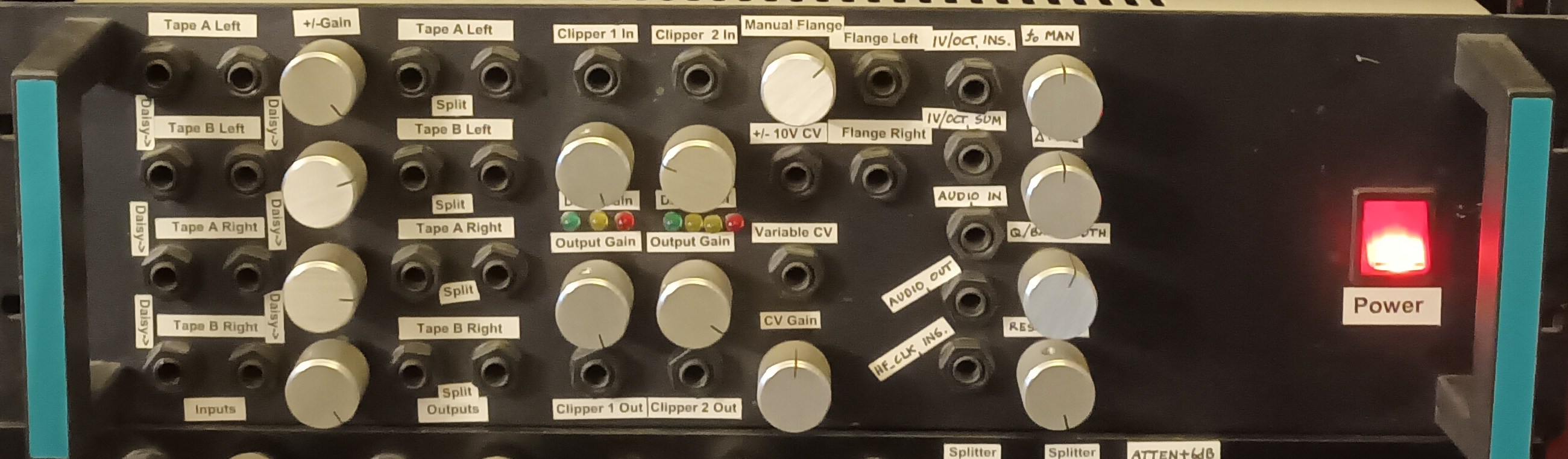
Mains power isolator neon rocker switch
Tape A manual speed control, sums with bipolar voltage input control
Tape A output gain left, gain range
±1.0
Tape B output gain left,
gain range ±1.0
Tape A output gain right,
gain range ±1.0
Tape B output gain right,
gain range ±1.0
Main Signal I/O Front Panel
Tape A input left sum of two ¼"
jacks
Tape B input left sum of two
¼" jacks
Tape A input right sum of
two ¼" jacks
Tape B input right sum of
two ¼" jacks
All inputs are daisy chained so that
connection to 1 feeds 2, 3 and 4 before insertion of another
jack.
This allows easy use of most
effects in stereo by connecting the second input channel to
input 3.
Fixed gain voltage input speed
control ±10V ¼" jack
Variable gain voltage speed
control input max sensitivity ±1V ¼" jack
Tape A output left split on two ¼"
jacks
Tape B output left split on
two ¼" jacks
Tape A output right split on
two ¼" jacks
Tape B output right split on
two ¼" jacks
Flange 1 output, sum of tape A and
tape B left ¼" jack
Flange 2 output, sum of tape
A and tape B right ¼" jack
The four knobs and five jack sockets
on the right are a separate clocked filter VCF which are not
relevant to the flanger, being just part of the overall analogue
synth wall.
Main Signal I/O Rear Panel
IEC Mains inlet fused
Tape A record LR dual phono
Tape A playback LR dual
phono
Tape B record LR dual phono
Tape B playback LR dual
phono
Tape A motor speed control 3 pin XLR
pin 3 ground
pin 1 12V from tape machine
pin 2 motor drive to tape
machine
Indicators
One 3 X LED clipping level indicator
and one 4 X LED clipping level indicator
Tape Flanger PDF Schematic flanger01-01.sch
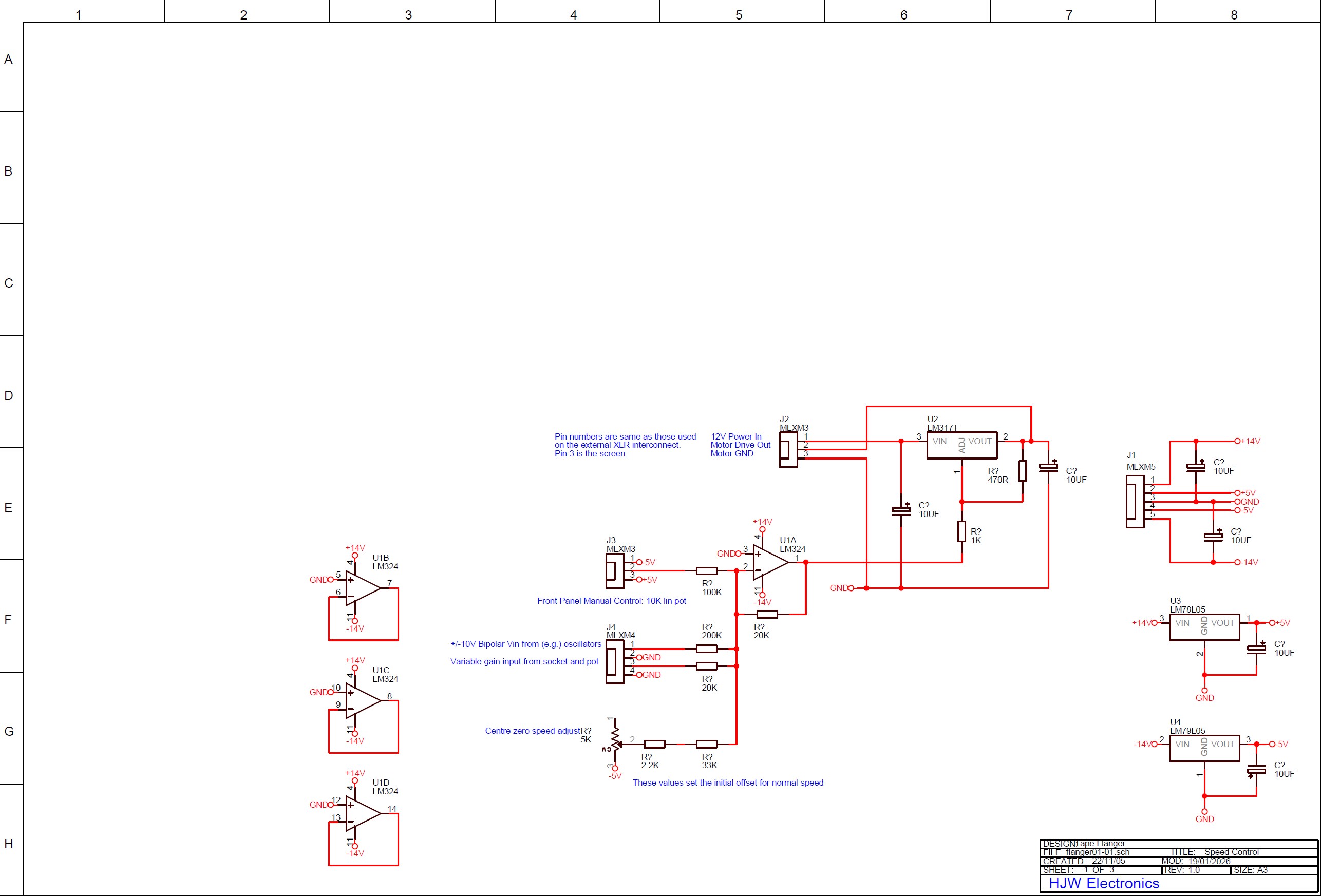
This sheet has standard regulators to provide regulated +/-5V reference rails and the motor speed control circuitry. Tape machine A in this prototype setup has a 12Vd.c. motor which has an internal electronic speed control, adjustable on a screwdriver control through a small hole in the rear. The motor has been set to its maximum speed on this control. The circuit here is provided with the 12V supply which would normally drive the motor with its internal regulation. This is reduced to a nominal voltage which gives approximately the correct normal running speed. The speed regulator internal to the motor is thus running in drop-out, and speed regulation will not be particularly good. However this is not a major problem for a flanging effect where the speed is usually changing constantly. It should be considerably more controllable than the historic method of applying finger pressure to rotating tape spools. The external regulator is a traditional LM317, set to provide a certain voltage if the lower 1K resistor were to be grounded. The op-amp arrangement lifts this node to a higher voltage which is seen directly impressed on the voltage output. The op-amp input side sums the manual control voltage from the front panel pot with the external control voltage. An adjustment preset voltage is also summed in and sets the normal mid-point running speed.
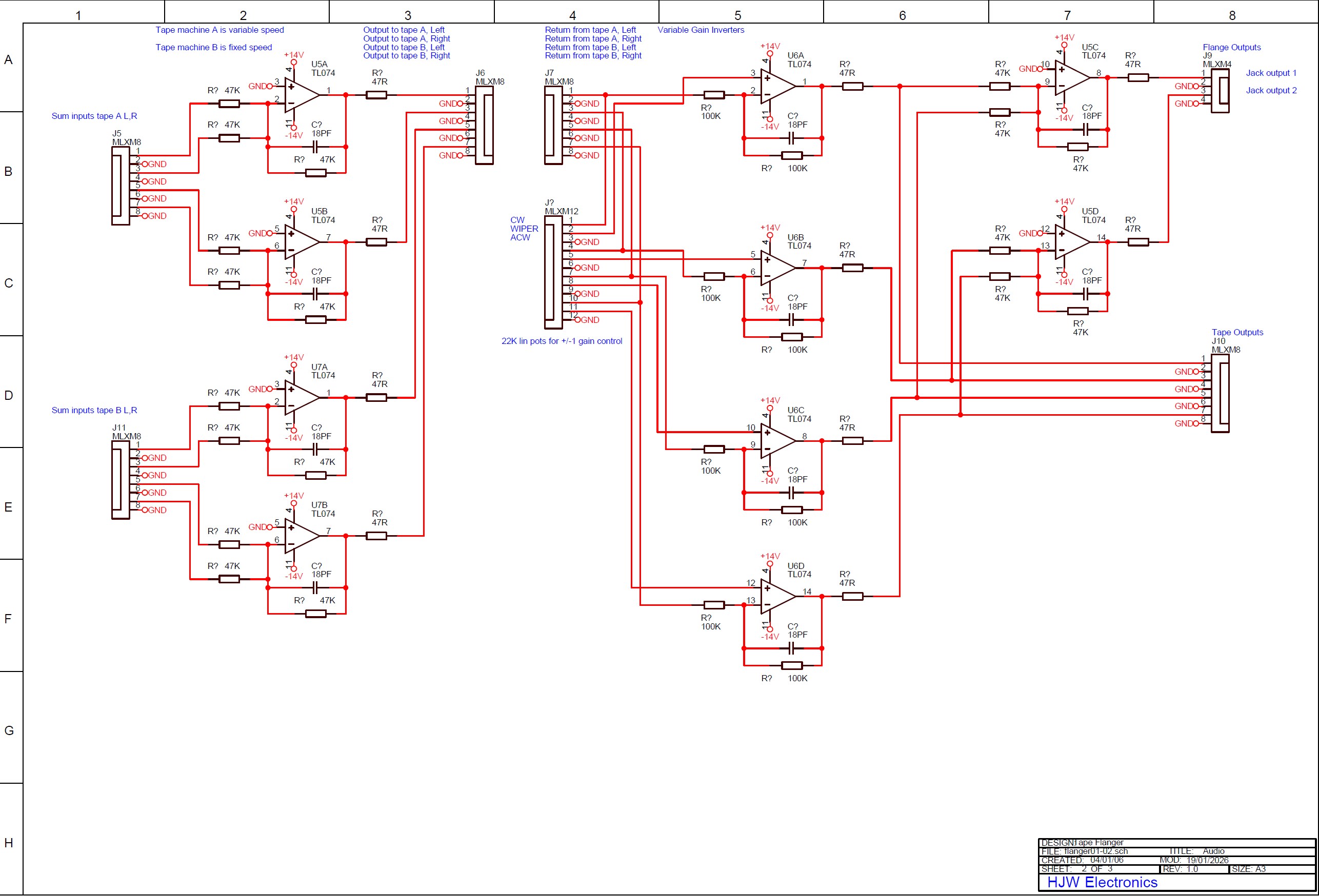
Tape Flanger PDF Schematic flanger01-02.sch
Tape Flanger PDF Schematic flanger01-03.sch
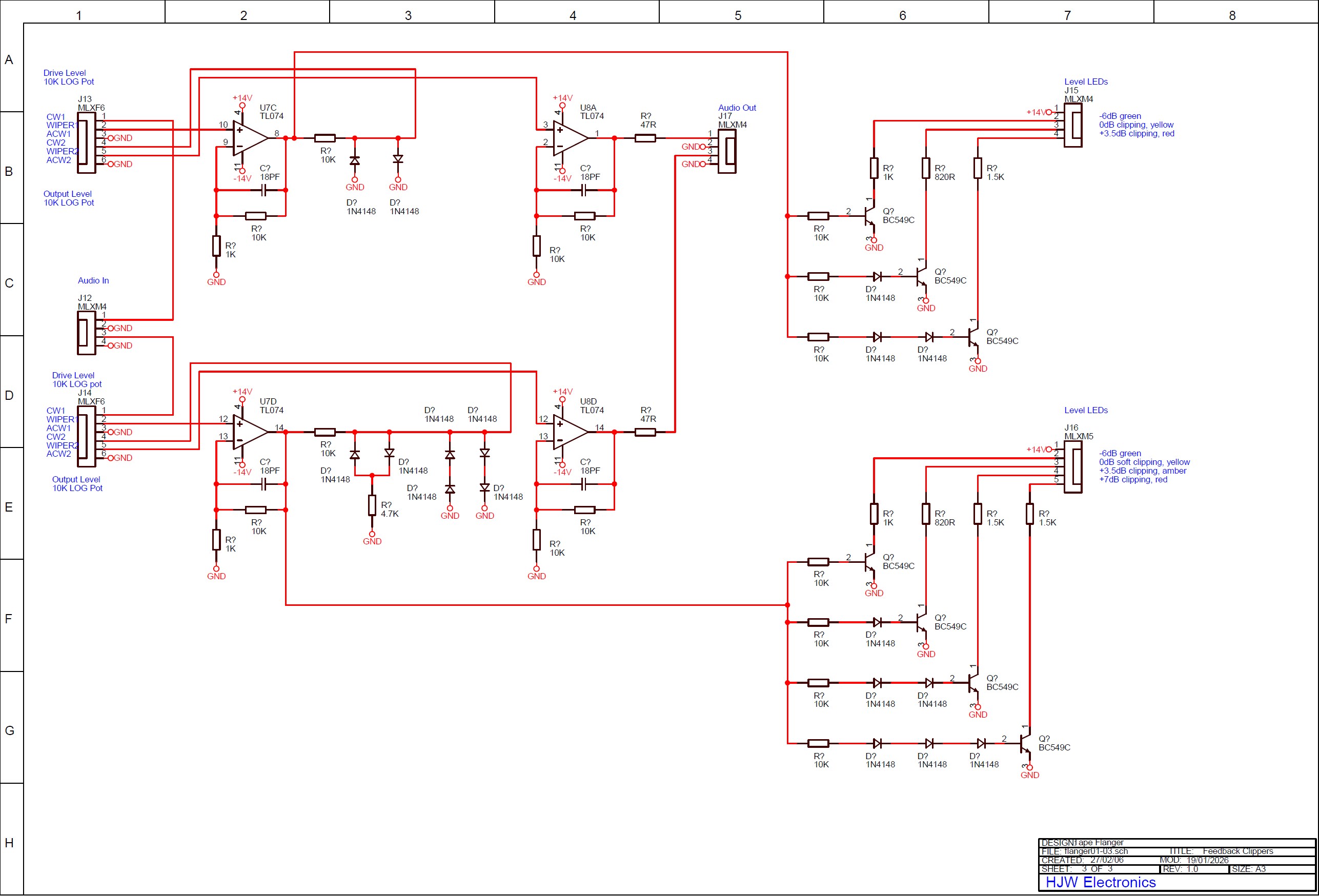
This sheet has the two clipping
circuits which can be used to pre-clip feedback signals to limit
actual tape overload. These are independent and can also be used
externally for other clipping effects. On clipper 1, a three LED
level indicator shows green, yellow and red. Yellow is the
clipping start point. Green is -6dB from clipping and red
indicates +3.5dB from the clipping start point. A completely
standard double-diode circuit is used. On clipper 2 a second
knee is added to the circuit and there is a four LED indicator.
Green indicates a signal -6dB from the first clipping point.
When the first knee is reached the first yellow LED will light
and there is a region of 3.5dB where the gain is reduced by 6dB.
This is a region of soft clipping. When the second yellow LED
lights the signal is +3.5dB from the soft clipping start and
standard clipping begins. The red LED lights at +6dB from the
start of soft clipping and is +2.5dB above the hard clipping
point. The upper drive control knob determines how hard the
diodes are driven. The lower output gain knob provides make-up
gain if needed.
Operation, Flanger Mode
Audio input is connected to Tape A left, jack 1. If stereo flanging is required the second channel is connected to Tape A right, jack 3. The internal daisy-chained input socket wiring automatically splits the signal inserted on jack 1 to jack 2. The same applies to jacks 3 and 4. The tape machines should be set up to give a reasonable recording level and about unity gain through the machine. All gain pots can be set to +1 initially and the manual flange control to its mid-point. When the machines are started, each flange output for left and right will be present on flange outputs 1 and 2, left and right. The familiar effect should be clearly audible when the manual flange control is rotated away from its centre setting. A deeper effect may be obtained by moving pots for tape machine B (or A) over to the -1 gain setting and adjusting for minimum output with the flange control dead centre.
Sound of Pseudo-Random White Noise After Stereo Tape Flanging
Rapidly moving the flange control will create a pitch shift in the output signal proportional to the rate of change of the control. With the original and the pitch shifted signal being added together, this creates a chorus effect. Using an external oscillator to change the speed continually makes this quite practical, though the rate of change is limited by the mechanics of the tape transport. The flange control starts fully anti-clockwise which is the position where tape A is at maximum speed. It moves through the centre position and you can hear that the effect extends to a lower frequency on the clockwise side where tape A runs more slowly.
Sound of Tape Based Chorus Effect
Using tape A will allow a small variation of the delay time by adjusting the flange control. "Love is a Four-Letter Word" introduction from Get Carter used to demonstrate tape based chorus effect. This is using a slow triangle wave from an LFO to drive the variable gain CV input. On the first phrase the gain is at zero, resuting in just a flangey sounding output. On the second phrase has the CV gain is increased to create the chorus effect, then zero again, then gain up once more. The effect has been made quite exaggerated here.Operation, Single Echo Mode
Mono audio is sent to input 1. As the inputs are chained, delayed audio will then be present on all tape outputs, and any tape output can be externally summed with the original input to create a single echo.Operation, Multiple Echo Mode (Special)
Mono audio is sent to input 1. One of the tape 1 outputs is patched to input 2. Tape 2 output is patched to input 3 etc. The input signal and the four tape outputs can be summed externally and depending on appropriate setting of the gain pots and record levels it will be possible to have the initial input sound plus four distinct echoes. The four echoes can be made to die away or increase in level depending on the gain settings. Each echo will suffer another generation of cassette tape.
Operation, Sub-Unity Gain Echo Feedback Mode
Mono audio is sent to input 1. Any of the tape outputs can be patched back to its own respective input and gains adjusted to give a tape echo which dies away over time. By patching output 4 back to input 1 a longer echo delay time with more cassette generations is possible.
Operation, Over-Unity Gain Echo Feedback Mode
Mono audio is sent to input 1. Any of the tape outputs can be patched back to its respective input and gains adjusted to give a tape echo which increases until the tape saturates. The clipper circuits may be patched in to saturate the clippers rather than the tape. This might be useful for a slightly different sound. This is the kind of effect used in ancient times by the BBC Radiophonic Workshop to produce the eerie sounds from "The Quatermass Experiment"
These pictures were taken before the
addition of a separate VCF circuit which is not intended to be
used with the flanger as such.
Rear Panels and Interconnects

Insides

Closeup Of Boards

In an ideal world, you'd have two
identical three head cassette decks. As we're in an ideal world
now, those decks would also have a fine speed adjust control,
probably with quartz locked accuracy in the centre detent
position. Then you would be able to either just use that on one
deck as a manual flange control, or tap into one of those pots
behind the front panel to interface with all the CV flange
control funs. That would reduce the circuitry in the control
unit, and the final speed control would be more accurate. Such
tape decks do exist; The problem is finding two of them for sale
at the same time in servicable condition and at a reasonable
price. If you see just one at any given time, it can be a
long time before you meet another and the investment pays off.
In 2006 these machines were not particularly expensive
second-hand items. I imagine they are getting rarer now, and
will be well into the, "described as vintage" (er-hem) category.
I use two C60 metal tapes. C90 is a
better option as the additional 15 minutes is very handy while
you're playing around getting all your effects spot-on. Good old
type I ferric tapes will give different saturation sounds. Watch
out for the auto tape select switches at the top left of the
cassette if your machines have them. If they are a bit old, they
can need a bit of a clean or a wiggle to get them going. The
display will show the tape type selected.
Other Effects
You can do single tape echo, double
tape echo, multiple feedback 'student radio' echo,
and things can get even more interesting if you put another
effect in the feedback path. For example, you can use an analogue
frequency shifter like mine to create rising and falling
pitches on the echo. An example of the rising pitch twinkle
effect was created by the BBC Radiophonic Workshop and added
to the Dr. Who theme tune after the first few years of the
programme. Or you can use a spring
reverb unit to create an echo with multiple reverberation.
Or you can do both and more. I went to town on this using
repeated 1kHz pip tones in the video shown below. The imperfect
nature of the tape noise and saturation can create all kinds of
sounds that you heard on old movies. It tends to be quite
difficult or impossible to get it exactly the same twice. That's
all part of the real tape based fun.
Philips Compact Cassette Tape
Deck Musings
Eeee, them were't days, eh? Back in
the 1970's, tape decks were often a fairly sorry affair when it
came to sound quality unless you spent a fortune, but things got
steadily better. I had a budget hi-fi second-hand TEAC V380-C
for years from 1990 onwards, and it sounded great. Back then I
could even hear the difference. These three-head types were a
lot more expensive and no doubt even better. There are all sorts
of funny little markers on the displays that you may never have
noticed. You can record to a higher level on chrome Cr02 type II
and evaporated metal type IV tapes, and there are little markers
on the recording level display to show you the new 0dB peak
target point. Whatever happened to Cr02 type III formulation?
Answers on a postcard or the back of a sealed down envelope.
Dolbies
Dolbies, as they were described by,
"The Phantom Of The Paradise." Universally Awful. We used to
call it, "The Muffler Switch." If you want some more technical
comment than Universally Awful, then I offer you constantly
changing phase matching between stereo channels. Just record at
a higher level and put up with a bit of tape saturation instead.
There are Dolby level markers on the level displays as well.
They mean something, but I'm not interested. I may have some
time for HX so-called Pro headroom extension, if I can turn it
off.
Adjustable Tape Recording Bias
Level
This is one of the little-used true
wonders of higher end tape cassette decks. On a three head
machine, setting the adjustable tape recording bias level is a
doddle, and it can be well worth the trouble. Set to record with
a constant tone, usually 1kHz, while monitoring the output level
on the downstream replay head. Adjust the bias level control for
maximum signal. It can be slightly different with different
brands of tape and the three available formulation types. If you
have a two head deck with adjustable recording bias, setting it
up is a rather more tedious hit and miss affair involving
recording the tone, rewinding the tape, playing it back, noting
the output level, then tweaking the bias control and repeating
the process.
More Flanger Recordings
Video of "Synchronise"
in Ambisonic UHJ Surround Sound, along with an interesting
X-Y visual accompaniment on the oscilloscope.
Henry's main email address: